At the time, I was only familiar with Strange’s Programming and Metaprogramming in the Electro-Organism: An Operating Directive for the Music Easel. Thanks to the generosity of the Buchla Archives, I had the chance to explore the first edition of Electronic Music. As I read, what resonated most is how the book bridges artistry with the technical fundamentals central to performing electronic instruments.
Later that year, I was asked to perform on my Buchla system at an event in San Jose, CA. The venue was just a few steps away from the campus where Allen Strange had established the electronic music studio at San Jose State University, and while developing the piece I was inspired by the significance of this location in the history of electronic music. This connection became a guiding influence in shaping the composition.
In the closing of Electronic Music, Allen Strange offers this observation:
“A single momentary sound may be the result of three or four hours of re-patching and re-recording… the perceiver cannot hear the amount of time and planning spent on the production of an event. As listeners, we don’t judge the aesthetic content of a composition by the time spent on its creation, but rather by its sonic information.”
This passage inspired the title of the work.
The Buchla system used for this performance features a combination of older 200 Series modules from the 1970s, as well as 200 and 200e Series modules from the 2000s, and newer 200e modules from the 2010s. The system also incorporates a Studio.h dual prismatic oscillator, and certain sections were further embellished with additional parts from a vintage Buchla Music Easel, and a Buchla 265 Source of Uncertainty module.
While the performance is not without flaws, the capricious nature of the instrument imbues the composition’s simple structures with a uniquely unpredictable quality.
A Single Momentary Sound is now available to stream on Bandcamp
Quadraphonic version available for download
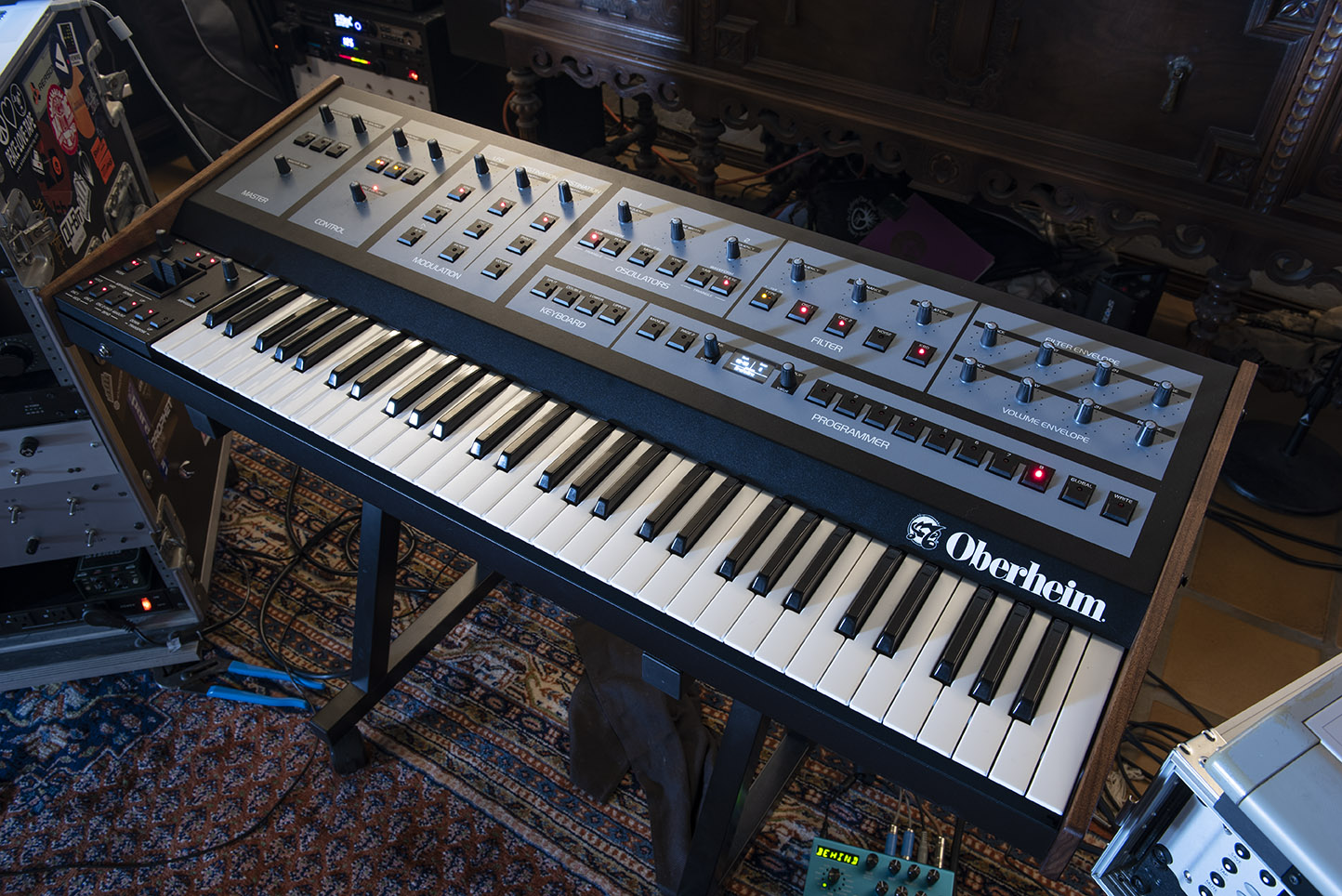
Even as I compose this entry, development and final tweaks to the Oberheim OB-X8 are probably still on going. Of all of the hardware projects I’ve been involved with over the past few years, this one has gone through the most rigorous development in an effort to faithfully reproduce the sound of the vintage Oberheim synths. Keep in mind that the OB-X8 is a successor to the OB-X, the OB-Xa, and the OB-8. Essentially, there are three instrument systems that are being reproduced and packaged into one new keyboard. Pictured above is the prototype unit that I worked with to develop programs for the instrument. The knobs in the photo are not the final version which are reproductions of the classic skirted type.
Late last year, I dug up my old OB-8 and opened it up for some much needed maintenance. The filters were in need of calibration and the keybed required some cleaning, and after a bit of TLC it played great. The Oberheim/Sequential development team borrowed this unit for analysis. More importantly, Marcus Ryle is involved, and he has all of the institutional knowledge of how the instruments were designed, built, modified, and operated.
The original factory presets will ship with the OB-X8, and they sound exactly like they did decades ago. Listening to these presets is incredibly nostalgic since you can find sounds used by Prince, Van Halen, The Cars, Thompson Twins, etc. etc. It’s pretty amazing how many hit songs used an Oberheim.
There are some new features accessed through an updated Page 2 menu, the OB-X8 preset specs incorporate these features, especially velocity and aftertouch. You can control Xmod intensity and oscillator levels, and noise generator level, which expands the range of timbral generation quite a bit beyond the original OBs. There are also panning functions for stereo presets which adds a little something extra to the bank of sounds. Because there are different envelope and LFO responses between the original instruments, one of the features allows you to mix and match these settings as well.
Below is an audio demo of the programs I’ve created for the OB-X8. Since the instrument does not have built in effects, I’m running the instrument through a Strymon Big Sky and switch in/out reverb to provide a bit of comparison on how it sounds effected vs. dry.
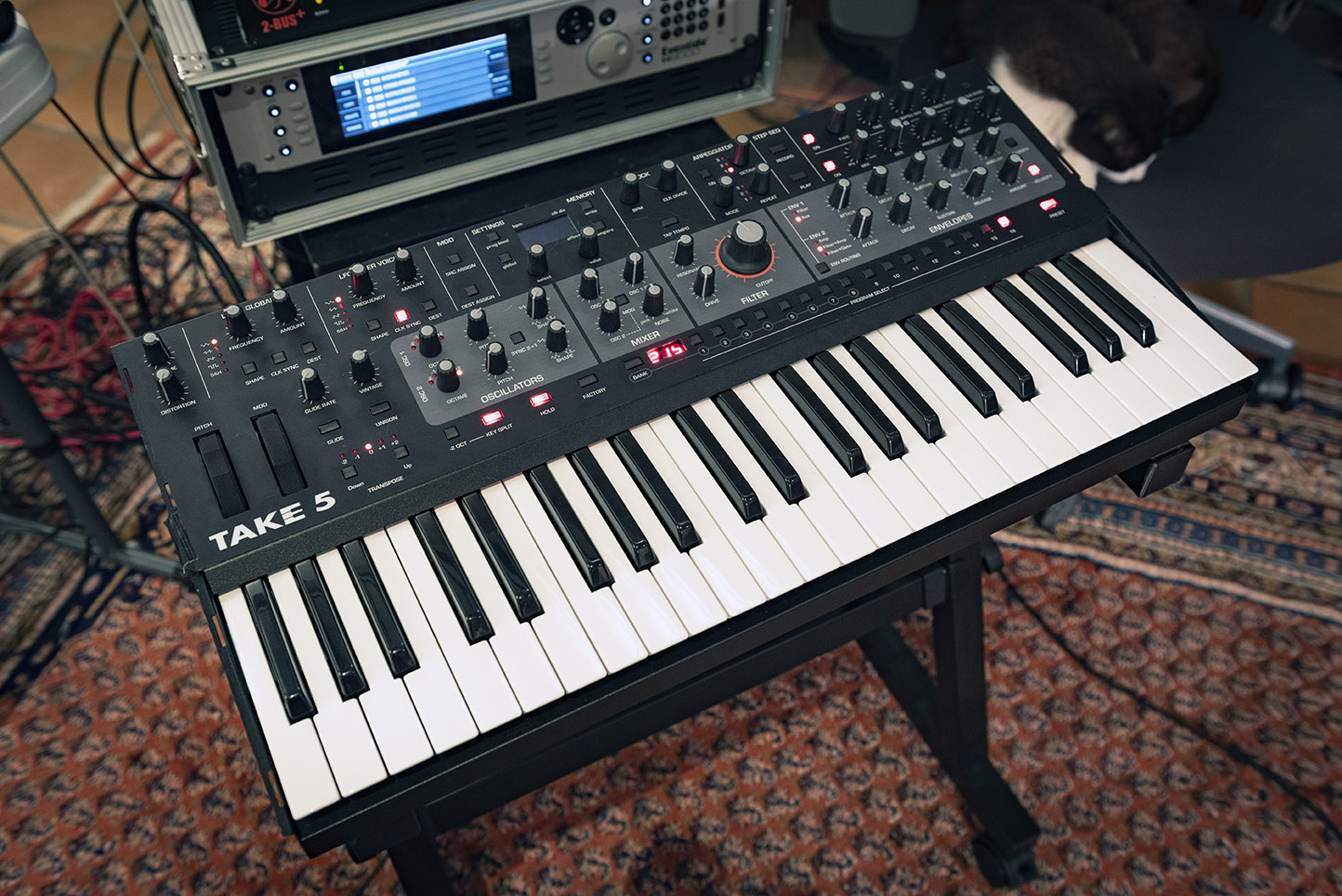
Here’s the new TAKE 5 synthesizer from Dave Smith and the guys at Sequential. It’s a five voice polyphonic analog keyboard with all of the cool features of the Prophet 6 and the filter circuitry of the Prophet 5 Rev 4, but it’s housed in a smaller chassis with a smaller keyboard. Personally I’m pretty surprised about how nice this instrument sounds. It has the all of the “bread and butter” features of an analog poly, but it plays like one of the T5’s bigger cousins.
Pictured above is the prototype T5 used by us who voice the unit and beta test. It’s missing the end caps and the layout is slightly different than production unit. It has similar profile to the Sequential Pro3 and the knobs and buttons are identical.
The general layout of the panel is pretty intuitive, and in some ways it has the vibe of a Roland Juno-106. It’s really easy to navigate and program and dial up a sound quickly. While there can be some menu diving to get deeper into mod routings, you don’t need to go down that path to get some very satisfying results. The T5 has far less program memory than other Sequential instruments, so users may need to learn how to perform sysex dumps to archive program banks.
Those of you who are familiar with the Sequential modulation routing environment will find that features have been changed to accommodate the reduction in features. For example there are two LFO modulation sources. One is per voice while the other is global. Some of the modulation targets are polyphonic per voice, however some targets are monophonic. Sources and Targets are noted with a [P] for polyphonic or an [M] for monophonic. Depending on how modulations are routed between Poly and Mono points, the voicing may result in sounds that have paraphonic characteristics.
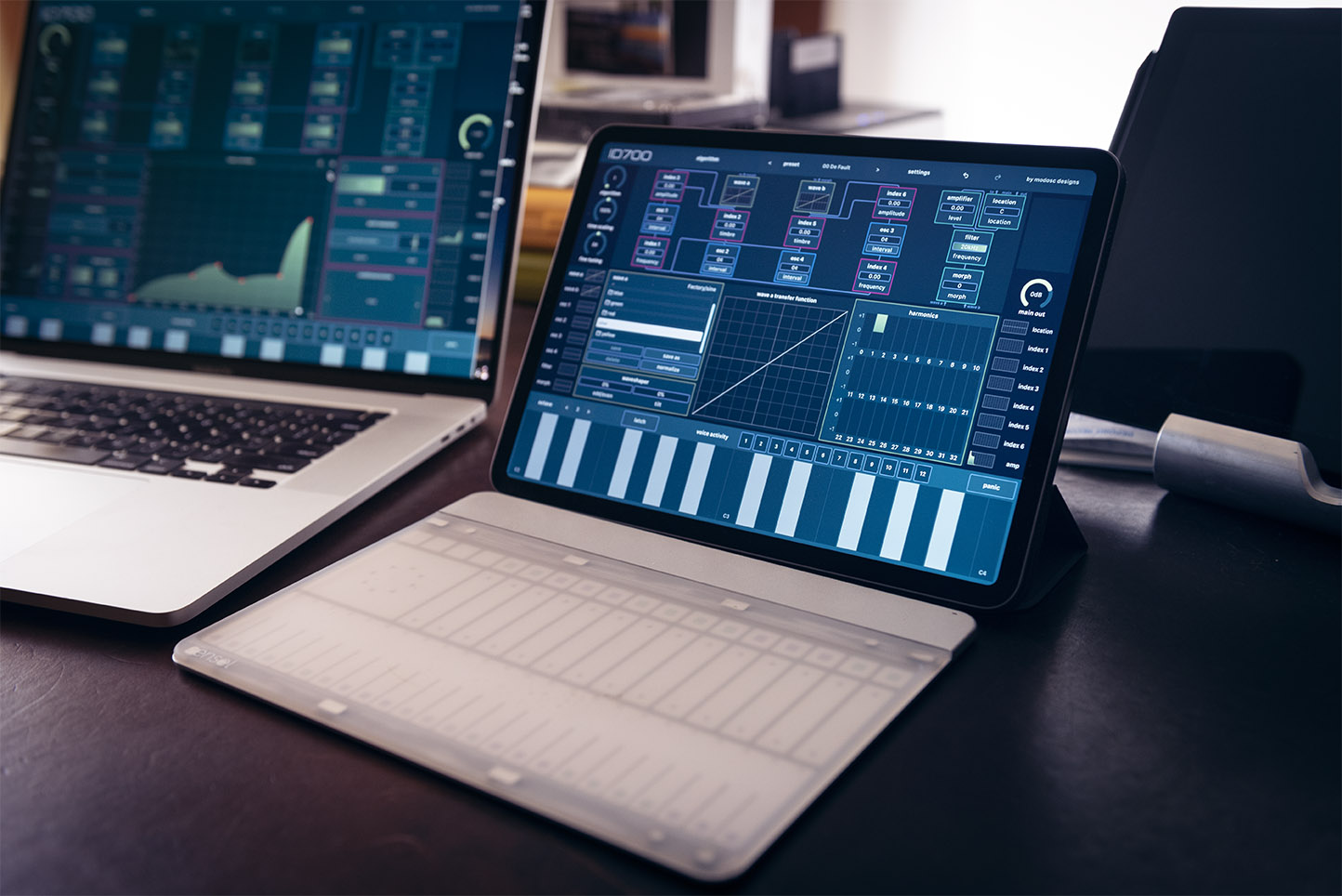
The ID700 from modosc designs is a 12 voice digital synthesizer based on the Instrument Designer architecture of the Buchla 700. The voicing structure is predominantly algorithmic FM, however it is FM that is combined with programmable waveshaping. There are several algorithms that are configured for common 2, 3, and 4 op FM roots, stacks, branches, however the combined FM sources are always processed through a look up table that adds more timbral flexibility. Even a single sine wave generator without frequency modulation can be transformed into a pulse wave through the wave shape functions. Additionally there is a type of Amplitude Modulation routing which can be configured as a kind of timbral modulation. This is all quite different from DX-style FM synthesis. For those who are familiar with Buchla 200e systems, the routing and controls are more like the 259e Twisted Waveform Generator, and the 261e Complex Waveform Generator. In fact there are controls for Morph between two wave shaper signal paths, and index controls, very much like the 259e.
Jonathan Schatz first gave me a demo of this project in 2018, and I’ve been eagerly awaiting it’s arrival. Needless to say I was ready to drop the banana cables when he asked me to help him with voicing ID700. Bear in mind, I have no experience using an original Buchla 700. I’ve heard recordings from Benge and Shasta Cults, and I’ve had the opportunity to see Alessandro Cortini’s 700 in real life. My approach to programming ID700 is based solely on an interpretation of the system as presented: Four oscillators, two wave shapers, index controls (mod amounts), modulation envelopes, a low pass filter, crossfader, and panning–configured in twelve routing schemes. Whether or not ID700 is a true emulation of the Buchla 700 doesn’t really matter, however the architecture does command a workflow that feels like Buchla. And at times it really does have timbral qualities similar to a 259e and even at times it can sound like a Buchla complex waveform generator.
One side project that emerged during the voicing project was the incorporation of the Sensel Morph. Using the Innovator’s overlay, i mocked up a control surface inspired by the Buchla 700. The sliders are mapped to control the main algorithm parameters and a 24 key MPE keyboard sends note on, pressure, and CC74 messages. The XY pad and long pot are mapped to various CC messages, and other controls include algorithm switching, time scale adjustment, sustain pedal, and midi panic. For those interested in trying out the map with the Sensel innovator’s overlay, you can download the files here:
2020 needs some good news… and Dave Smith has been working hard to bring it to you!
Sequential announces the return of the Prophet~5!
Decades after the last P5 Rev 3s shipped, the new Rev 4 features the same fundamental features with improvements to modulation and MIDI implementation. Rev 4 also has a “Vintage” control that modifies the response to simulate characteristics of different generations from Rev 1 to Rev 4.
Programming a Rev 4 is the same as a vintage Prophet~5, so this voicing project was fairly straightforward. The modulation routings are limited, so programming relies on application of poly-mod, envelopes, oscillator detuning, waveshape selection, etc. Even with the limitations, the Rev 4 Poly Mod is vastly improved from a Rev 3 which makes it easy to start with FM tones as the basis of subtractive synthesis sounds.
I have a Rev 3.3, and other than having the issue with bushings and stuck keys, it’s stable and still sounds great. It’s currently at Sequential with other vintage Rev 1s, Rev 2s, and Rev 3s that have been analyzed to develop the “Vintage” control feature.
The burning question is “Does it sound like the original?”
My answer is “kinda.”
There are always going to be slight differences in tonality between analog instruments. It’s just part of the nature of electronic components and time, so any comparison between the Rev 4 and older Prophet~5s is generalized. So yes, it generally sounds like my Rev 3. Thick bass patches and rich pads sound like a classic Prophet~5, but as I mentioned before, Poly Mod opens up the instrument to a wider palette of timbres.
It’s not exactly the same though. The Rev4 has a lower noise floor, and you don’t hear the transformer humming inside the unit. And the modern key bed doesn’t click when you play.
Many creatives seem to have adapted well to the unexpected conditions of 2020 and managed to be incredibly productive under these incredible circumstances. Other obligations occupy most of my time these days and have not had the time or energy to be creative, but I have been enjoying listening to some the great releases from friends and colleagues.
In the little spare time available, I’ve been taking care of some digital housekeeping and finally managed to post up audio from my performance at Synthplex 2019. This is a performance on a Buchla system presented in quadraphonic sound. The only recording from the event is a two channel capture from the A/V team controlling the visuals and sound.
The patch was structured in five parts that build through a range of tonal and atonal techniques. It was not a fully preprogrammed performance, and because the patch relies on the Buchla 272e FM tuner module, there’s a risk factor involved in trying to play off whatever signals are flowing through the ether. Frankly, this performance was not the best representation of what the patch can sound like. There was no soundcheck, and I didn’t have time to get all of the initial settings for the patch dialed in, and I struggled during the first two sections to get things together (and in tune). Finally about half way through during the third movement, things started flowing well and I was pretty happy with the last sections.
I recently completed a voicing assignment for the new Pro 3 synthesizer from Sequential. This is their new mono synth that carries on the tradition of the legendary Pro 1 and popular Pro 2, but the Pro 3 mixes things up a bit by incorporating a wavetable oscillator along with two analog oscillators. The filter section has three selectable types including popular low pass circuits and the Oberheim SEM filter circuit. Pictured above is the prototype unit used for developing factory programs for the instrument.
For several months now, I have had the opportunity to experiment with prototype and see the instrument become complete. Sequential asked if I could contribute some tables, and I was little reluctant. Other than generating basic mathematical functions as LUTs, I don’t have much experience developing wavetables, unlike the hardcore experts, Robert Rich and Drew Neumann. They created the real bread and butter wavetables included in the Pro 3. The Sequential Team and Dave gave me some room to just experiment a bit and see if I could come up with anything usable.
There are no commercial products available for the specific task of developing wavetables. While any decent editing application would work, I wanted something that would let me control windowing and audition at different playback rates to simulate oscillator scan rates. I ended up making a max/msp patch that allowed me to import and time compress audio files, make small edits and modulate harmonics, then export to WAV files for transfer to the Pro 3. While it was pretty easy to create some basic tables, the content from Drew and Robert was superior to what I was producing.
I ended up going back to my 808 sample library and flew in the bass drum, the snare drum, the clap, cowbell, hi hat, etc. After massaging the sounds a bit, we imported them as a 16 individual tables into the Pro 3 and what started coming out was completely different from anything we’ve heard before. It was like a weird revelation that a crude 1024 sample file could still capture the vibe of an iconic sound which could then become a voice in synthesizer patch.
The “Sequential” wavetable is a sample of my voice. This was another experiment to see if it would be possible to create a set of speech based wavetables that could be modulated to say something … and still be somewhat musically useful in timbre generation. I don’t know about the latter objective, but it was an interesting challenge to pick out the right sections of a sample that would intelligibly reproduce consonants and vowels when scrolling through the 16 wavetable sections.
On the surface, the Pro 3 seems like “just another subtractive monosynth,” but it’s pretty surprising the range of sounds you can create with this combination of nice analog oscillators and the wavetables. All of the classic monosynth type sounds are easily available, but with the flexible mod sources and routings, the sequencer, and effects, the results seem like this is more than just one voice.
I’ve been testing the Rossum Electro Music Linnaeus multimode filter module which is going into production this week. Since it’s 808 day, i figured it would be interesting to see how it treats some classic electronic drum sounds. Linnaeus is a stereo module and you can invert the modulation of the two channels to create stereo imaging effects. There’s also a linear FM feature, including a modulation oscillator (with selectable waveforms). When the filter is in self oscillation, you can create “Chowning” style ringing tones, or absolutely destroy a tone being processed through the filter.
The 808 Bass Drum is isolated and running through the Rossum Evolution, and the 808 Accent trigger is pulsing Control Forge which has a random stepped voltage sequence which is patched to both Evolution and Linnaeus.
Synthplex begins in two weeks! This is new synthesizer event in Burbank, CA that features exhibitors, panels, DIY builder sessions, and electronic music performances. I’m scheduled to do a set on Friday, March 29th and will be using the Buchla with a nice quadraphonic sound system!
Tickets and more information are available on the website:
Danny Kim, known for organizing the Binary Society art and electronic music events around Silicon Valley, has created a new print publication called Open Source. I’ve contributed a rather technical article on decibels and voltage levels as they relate to synthesizers and control voltages, along with tips and approaches to interfacing different types of audio equipment.
Open Source
Open Source is a journal of synthesizer culture, visual art and technology. It was conceived and meticulously crafted for the synth community by passionate musicians and artists in Silicon Valley with collaborators spanning the globe. This limited run of 200 issues will only be available in physical print at select boutique synth shops. Each issue includes a 4GB microSD card loaded with audio visual goodies including two full-length albums. The ad-free publication retails at $30 USD / 28 Euros.
Issue 01 Features:
an in-depth interview about the virtual vs. sensual artistic process with ambient maestro, Robert Rich showcasing his personal paintings
a year-long development journal on the Endorphin.es BLCK_NOIR written by designer Andreas Zhukovsky
Interview with visual artist, Bill Wiatroski discussing “Manifestation”, his analog video installation in Alameda, CA
Creating electroacoustic instruments using contact mics by Nathan Moody
Guide to Granular Modular Synthesis by Austin Cairns
Decibel levels in Eurorack Synthesis by Kurt Kurasaki
And James Cigler’s perspectives on moving beyond East Coast vs. West Coast synthesis.
The included audio visual program on a 4GB microSD card contains:
Open Source Records presents “Rituals:in:Time”, an exclusive album by m.0 aka Maurice Jackson including the “Passage” music video directed by Danny Kim.
“Blck Noir”, an album from Principal Uno (Julia Bondar and Andreas from Endorphin.es) including a bonus track named,
“Le Fleur du Mal” and a behind-the-scenes video from the photoshoot.
An exclusive preview of r bene’s untitled album.
Five original patches from James Cigler, m.0, r beny, Distco and Qorser demoing the Endorphin.es BLCK_NOIR.
I’ve started reconfiguring some Buchla patches for quadraphonic playback. My living room isn’t the most ideal studio space for a quad speaker setup, but i have these old Meyer Sound Lark speakers on stands to act as rear channel monitors. With the power and audio cables running all over, the place is kind of a mess, but the Larks seem to work pretty well with the Amies.
The props have developed a new modular synthesizer rack extension for Reason! The most significant feature is the ability to make patch connections on the front panel of the device, and like any good modular you can create some interesting self-generating patches through a variety of randomization techniques. The principle synthesis approach is based around a Buchla style complex oscillator. There is also a lopass gate emulation to round out the “West Coast” sound.
The video above is a little demonstration of some of the patches I created for the factory presets in the rack extension.